
What Counts as a Conversion Event? Real-World Examples Beyond “Thank You” Pages

Why “thank you pages” are not enough anymore
For a long time, many websites treated one thing as a conversion: reaching a “thank you” page.
User fills a form → lands on /thank-you → conversion recorded. Simple.
This still works for basic lead forms, but the web has changed:
- Many products run inside a single page or app interface.
- Forms are split into multiple steps and modals.
- Users can complete important actions (like upgrading a plan) without ever loading a new URL.
- Mobile apps don’t even have “pages” in the traditional sense.
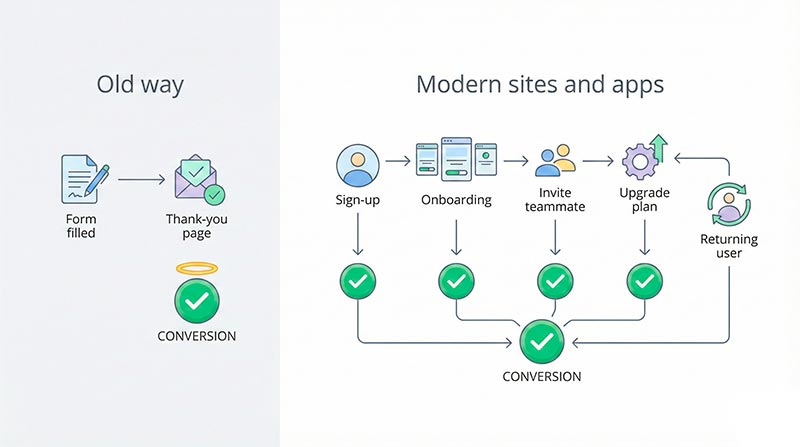
Imagine a SaaS product:
- A user signs up.
- They complete onboarding.
- They invite teammates.
- They start paying after a 14-day trial.
There might be no classic “thank you” page at all, yet a lot of valuable actions happened.
If you only track page loads, you miss most of the story.
That’s why it’s better to think in terms of events and clearly defined conversion actions, not just URLs.
Basic definitions: conversion, events, and conversion events
What is a conversion?
When people ask what is a conversion they usually mean “which user action do we count as success?”
In simple terms, a conversion is any action that creates real value for your business.
Examples:
- A visitor buys a product in your online store.
- A potential client submits a “Request a quote” form.
- A reader subscribes to your newsletter.
- A user upgrades from free to paid.
The exact definition depends on your business model, but the idea is always the same:
a conversion is a meaningful finished action, not just a click or a view.
What is a conversion event?
People often get confused at the next step: how do we track those actions?
When you store data, you don’t save “John bought a thing and we’re happy now”. You save a record like:
event_name = order_completeduser_id = 123order_value = 79currency = USD
This record is a conversion event: a specific tracked event that represents a successful action in your analytics. That’s usually the practical answer when someone asks what is a conversion event in an event-based tracking setup.
When you define one, you usually:
- Give it a clear, machine-friendly name (like
signup_completedorplan_upgraded). - Decide which properties it should carry (price, plan type, lead source, device, etc.).
- Agree that “when we see this event, we count a conversion”.
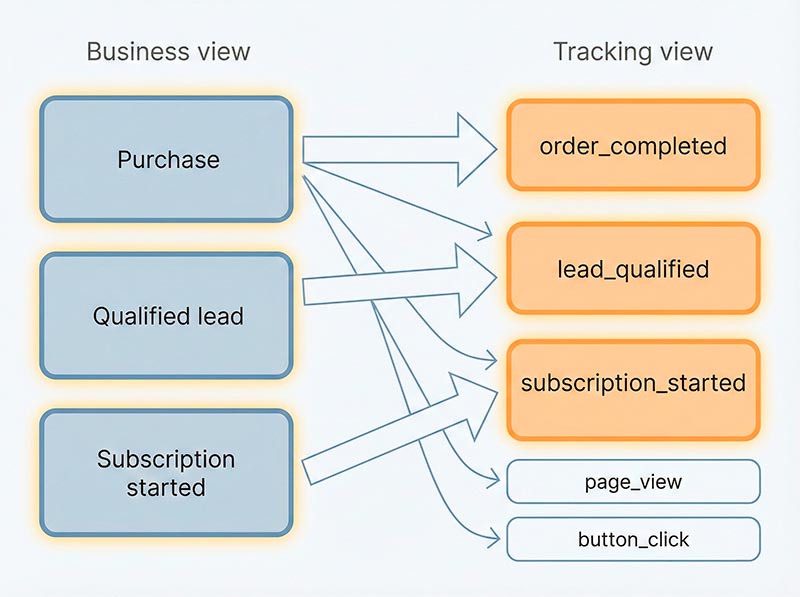
One business action can map to one or several technical events. For example, a purchase might generate:
checkout_startedpayment_submittedorder_completed
Only one of them should be your “true” conversion signal.
Macro vs micro conversions
In real life, not all success actions are equal. Some conversion events directly connect to revenue, while others are important steps on the way.
A simple way to think about this is:
- Macro conversions – your main business wins.
- Micro conversions – smaller steps that show progress toward those wins.
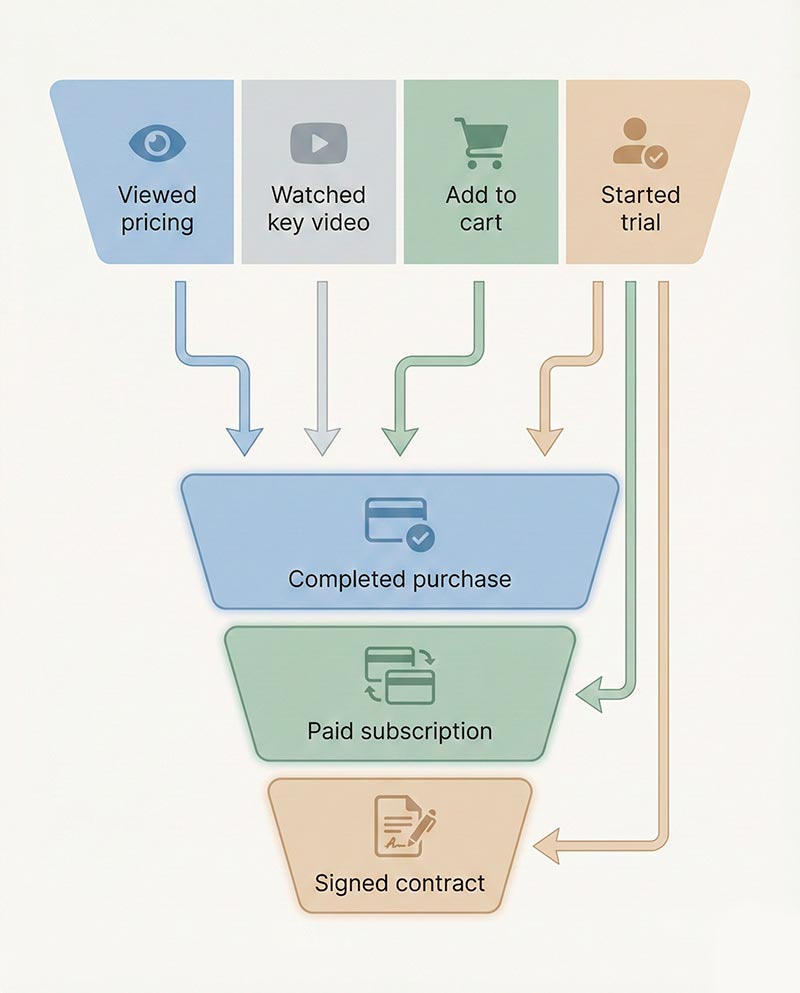
Here’s a quick comparison:
| Type | Description | Examples |
|---|---|---|
| Macro conversion | Direct, high-value outcome | Completed purchase, paid subscription, signed contract |
| Micro conversion | Meaningful step toward a macro outcome | Add to cart, start checkout, book a demo, start a free trial |
| Soft signals | Engagement that might predict future success | Scroll to pricing, watch 80% of a video, download a PDF |
Our own breakdown of what is a micro conversion walks through the tests that separate a real signal from ordinary engagement, with examples by business model. If you want outside perspectives too, check out guides on macro and micro conversions and micro conversions vs macro conversions — they expand on how these concepts are used in real optimization work.
You should track both. Macro actions show whether your business is working. Micro actions explain why things work or don’t.
Types of conversion events beyond “thank you pages”
Page-based conversions (yes, including thank-you pages)
Page-based conversions are still useful. They’re easy to implement and easy to understand.
Examples:
- Thank-you page after a form submit.
- Order confirmation page after a purchase.
- Special “Success” URL after a booking.
- A high-intent page like
/pricingor/checkout.
The strengths:
- Simple to set up: “when URL equals X → increment counter”.
- Good for static sites and simple flows.
- Easy to communicate to non-technical stakeholders.
The limitations:
- Don’t work well for single-page apps, modals, and in-app upgrades.
- Break if URLs change or if people refresh pages in weird ways.
- Cannot express many important actions that never load a new URL.
Page views are a piece of the puzzle, not the whole thing.
On-page and interaction conversions
Modern interfaces often keep users on the same URL while they perform many actions.
You need events that track what the user does, not just what they see.
Examples of interaction-level conversions:
- Click on the main “Start trial” or “Add to cart” button.
- Start checkout from a cart or product page.
- Complete a multi-step form inside a modal.
- Watch at least 80% of a key sales video.
- Submit a support request using an in-page widget.
These actions can be just as valuable as loading a thank-you page.
Sometimes they’re even more important, because they happen earlier in the journey and give you stronger optimization levers.
In-product and retention conversions
If you have a product or app, conversions don’t stop at sign-up or first purchase. Long-term success often depends on what happens afterwards.
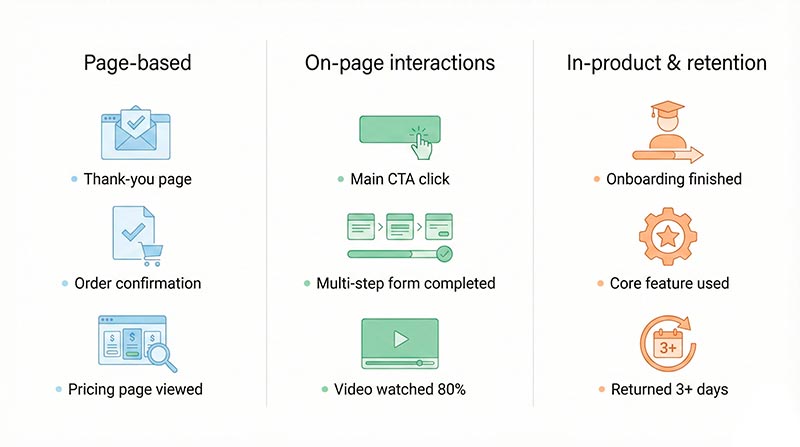
Typical in-product and retention-focused examples:
- Finished onboarding (completed all steps in the intro flow).
- Activated a core feature (for example, created a first project or imported a first dataset).
- Invited at least one teammate.
- Returned and used the product on 3 or more days in a week.
- Renewed a subscription after the first month.
These actions:
- Show whether users actually get value.
- Predict upgrades, renewals, and referrals.
- Help product teams focus on features that drive real outcomes.
If you only look at form submits or thank-you pages, you miss most of this value.
Choosing your primary conversion
In many analytics setups, the term primary conversion describes the single most important action you care about. It’s the one metric you’d pick if you had to ignore everything else.
How it looks in different business types:
- E-commerce: usually “completed order” (successful transaction).
- SaaS subscription product: user starts a paid subscription or a deal moves to “closed-won”.
- Lead generation: a qualified lead is created in the CRM, not just any form fill.
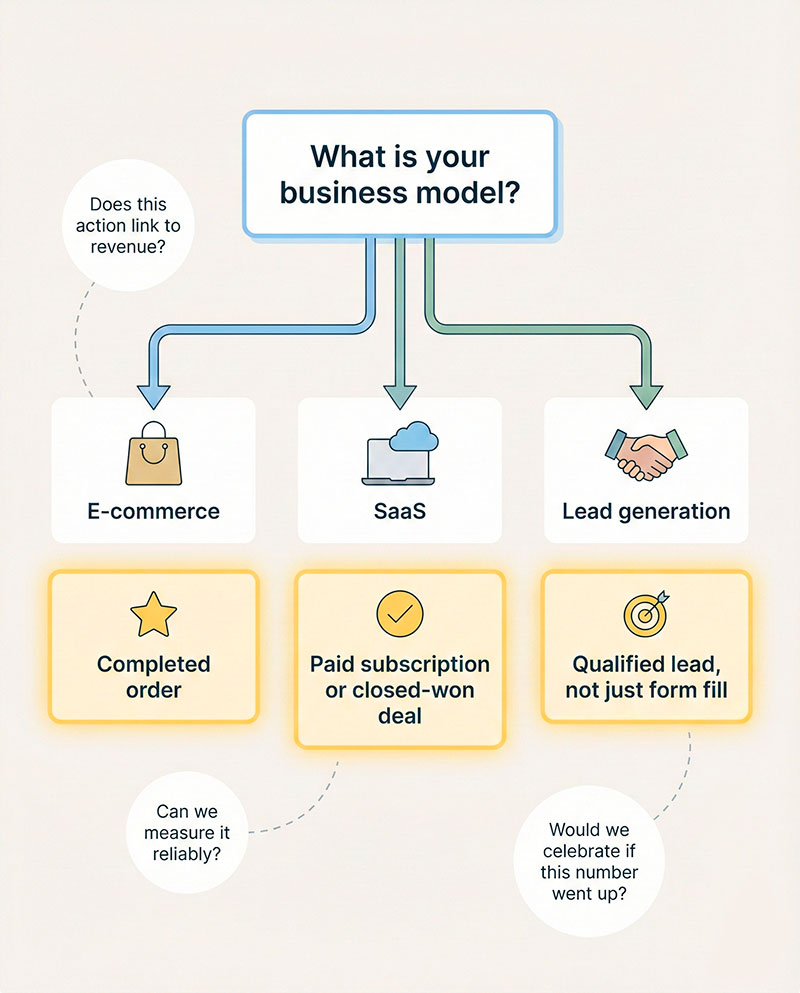
A quick checklist for choosing the main conversion action:
- Does it clearly connect to revenue or core business value?
If this number goes up, does your business health actually improve? - Would we celebrate if this metric increased while others stayed flat?
If yes, it’s a good candidate. - Can we measure it reliably?
Fragile tracking (for example, relying on rare pages or unstable integrations) makes it a weak primary signal. - Is it easy to explain to non-technical stakeholders?
People across marketing, product, and leadership should understand what it means. - Does it fit the current stage of the business?
Early-stage products might treat “free trial started” as success before they have strong paid adoption.
You can track many important actions, but having one “north star” keeps everyone aligned.
Purchase conversion and money-focused events
A purchase conversion is the classic example of a money-related success signal: a user completes a transaction and pays you.
In an online store or commerce-driven product, this might mean:
- Payment is authorized and captured.
- An order confirmation is generated.
- The system logs the order value and currency.
Why this event matters so much:
- Marketing teams use it to measure ROI from ads, email, and other channels.
- Product teams use it to see which flows or features drive revenue.
- Finance and leadership care about how many paying customers they get and at what value.
If you want to benchmark your results, it’s useful to look at public reports like ecommerce conversion rate benchmarks or breakdowns such as ecommerce conversion rate by industry.
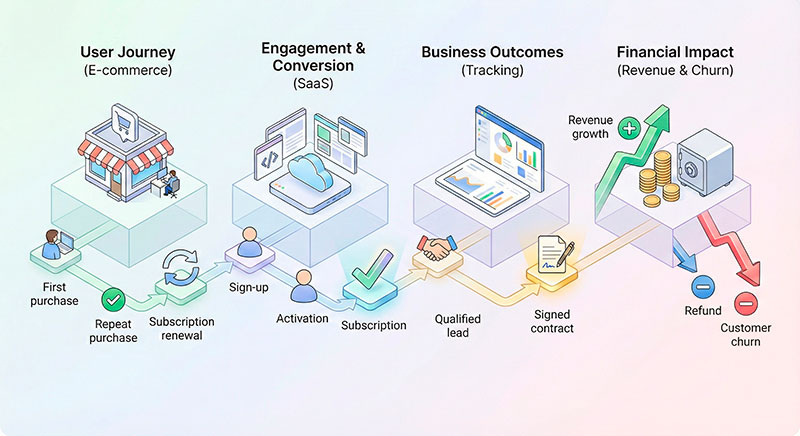
But a purchase-focused event is not always the only important money signal. Depending on your model, you may also want to track:
- Subscription started.
- Subscription renewed.
- Plan upgraded (higher price).
- Plan downgraded (lower price).
- Refund issued or order canceled.
Together, these events draw the full money picture: not just how many people buy, but how they stay, grow, or churn.
Goals vs events: connecting business thinking and tracking
When people talk about goals vs events, they often mix two different layers of thinking.
- Goals live at the business level: “We want to increase monthly recurring revenue”, “We want more qualified leads”, “We want users to successfully adopt feature X”.
- Events live at the tracking level: “User triggered
order_completedwith value 79”, “User triggereddemo_completedwith source ‘Paid Search’”.
A conversion in data terms appears where these two layers meet:
you can say “This event represents that goal being achieved.”
If you don’t separate the concepts, you might end up with:
- lots of events with no clear purpose
- vague goals with no way to measure them
The real power comes from connecting them properly.
From goals to measurable events
Here’s a simple process you can use:
- Define the business goal.
Example: “Increase revenue from new customers”, “Get more sales-qualified leads”, “Improve activation of feature X”. - Identify the user action that proves the goal was met.
- For revenue: a successful order or subscription.
- For qualified leads: a completed demo call or certain CRM stage.
- For feature activation: the first successful use of that feature.
- Translate that action into an event.
Give it a clear name and properties, such as:event_name = subscription_started,plan_type = Pro,billing_period = annual.event_name = demo_completed,lead_score = 85.event_name = feature_used,feature_name = "Collaboration",session_id = ....
- Agree on what counts as success.
Document a shared definition like: “We consider a user activated when we see at least onefeature_usedevent withfeature_name = X.”
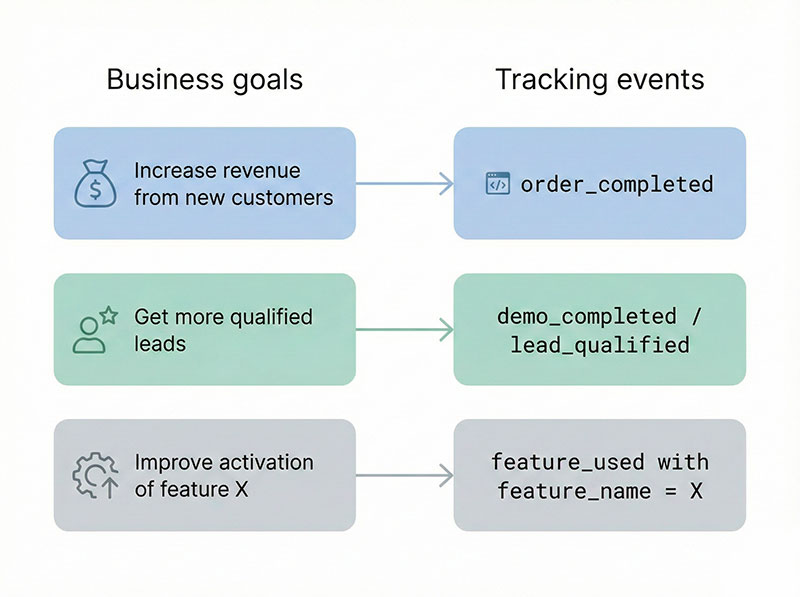
This way, your dashboards and reports are rooted in actual goals, not just raw clicks.
Common mistakes with goals and events
A few patterns show up again and again:
- Tracking everything “just in case”.
Teams send dozens or hundreds of events without tying them to specific goals. Result: noisy dashboards and no clear story. - Marking every small action as a conversion.
If nearly every event is labeled “success”, nothing stands out. Reserve conversion labels for actions that truly matter. - Inconsistent naming.
Events likesignup,signup_done,registration_complete, anduser_createdmight all mean the same thing, or slightly different things. Nobody is sure. - No shared definitions.
Marketing, product, and leadership each have their own idea of what “a lead” or “an active user” means.
How to avoid this:
- Start from goals, then define a small set of key events.
- Create a naming convention and stick to it.
- Document which events count as conversions and which are just behavioral signals.
- Review the event list regularly and clean up what you don’t use.
Conversion examples for different types of websites
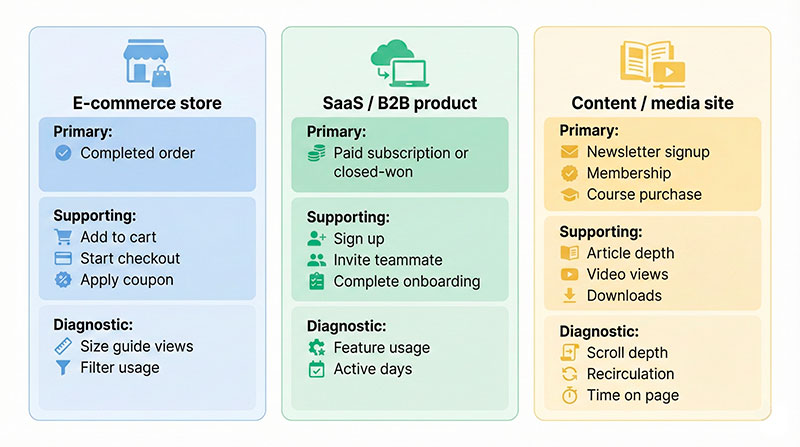
Let’s make this concrete. Below are examples for three common types of businesses.
For each, we’ll separate:
- Main success action
- Supporting actions
- Diagnostic or “nice-to-have” signals
E-commerce store
| Category | Example actions |
|---|---|
| Primary business action | Completed order |
| Supporting success actions | Add to cart, start checkout, apply coupon, choose shipping |
| Diagnostic signals | View size guide, use product filters, view shipping/returns info |
Here, the completed order is the core success. Supporting actions explain drop-offs, and diagnostic signals help you improve UX and content.
SaaS or B2B product
| Category | Example actions |
|---|---|
| Primary business action | Start paid subscription or move opportunity to “closed-won” in the CRM |
| Supporting success actions | Sign up, confirm email, complete onboarding, invite a teammate |
| Diagnostic signals | Use key feature, number of active days, number of projects created or saved |
In this case, the main paid milestone is crucial, but the supporting actions tell you if users are likely to reach and stay at that milestone.
Content or media site
| Category | Example actions |
|---|---|
| Primary business action | Newsletter signup, membership registration, course purchase |
| Supporting success actions | Read multiple articles, complete a long-form article, watch a key video |
| Diagnostic signals | Scroll depth, time on page, recirculation to other articles |
If you want to go deeper into content performance and engagement, look at practical guides like content performance metrics, content engagement metrics and this broader engagement metrics guide.
How to document conversion events in your tracking plan
A tracking plan is simply a structured document (often a spreadsheet) that describes which events you track and why.
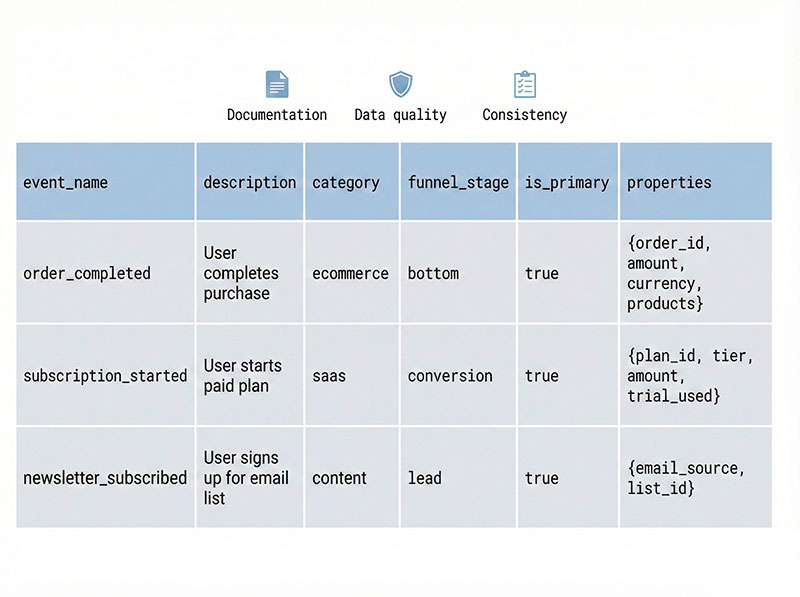
For conversion-related events, you might use columns like:
event_name– machine-readable name, e.g.order_completeddescription– what it means in plain languagecategory– conversion / engagement / diagnosticfunnel_stage– awareness / consideration / decision / retentionis_primary– true/falseproperties– key fields like value, currency, plan, lead source
Example rows:
| event_name | description | category | funnel_stage | is_primary | properties |
|---|---|---|---|---|---|
| order_completed | User successfully placed a paid order | conversion | decision | true | order_value, currency, items_count |
| subscription_started | User started a paid subscription | conversion | decision | true | plan_type, billing_period, marketing_source |
| newsletter_subscribed | User subscribed to email newsletter | conversion | consideration | false | subscription_source, content_topic |
If you work with leads and CRM, you may find ready-made tables such as
lead tracking templates useful, and for e-commerce, planning kits such as
ecommerce conversion tracking templates are useful — you can adapt them to your own event-based tracking plan.
Practical tips:
- Limit the number of “conversion” category events.
If everything is a conversion, nothing is. - Use consistent names.
Decide on verbs (completed,started,viewed) and stick to them. - Add just enough properties.
Focus on fields you actually use in reporting or modeling. - Review regularly.
Once or twice a year, audit your tracking plan to remove or merge events that no one uses.
Quick checklist: do you really know your conversions?
Use this checklist as a quick self-audit:
- We have one clearly defined main success action that everyone can name.
- We can explain which events are true business conversions and which are just engagement.
- Every important business goal has at least one event that represents it.
- Our main success actions are not limited to page loads; we also track key interactions and in-product behavior.
- Our most important signals are documented in a tracking plan or similar document.
- Event names are consistent and unambiguous across the product.
- Different teams (marketing, product, leadership) share the same definitions for key terms like “lead”, “active user”, and “customer”.
- We can confidently answer: “What are the top three actions that matter most on our site or in our app?”
If you hesitate on several of these points, you’ve just found your next analytics project.
Make conversions boring and predictable
Conversions should not be mysterious. They’re simply the few core actions that matter most for your business.
When you:
- move beyond just “thank you” pages,
- define clear success actions across the whole journey,
- connect business goals to specific events,
- and document those events in a tracking plan,
you turn conversions into something boring and predictable—in a good way.
Instead of guessing why numbers move up or down, you can:
- see which actions actually drive revenue and retention,
- spot where users drop off,
- and focus your product and marketing work on the steps that matter most.
Take an hour with your team this week.
List your main success actions, decide which events represent them, and clean up your tracking.
You might discover that what really counts as a conversion is very different from what you’ve been measuring so far.
Once you have settled what counts, the next question is whether your ad platform agrees with your analytics about it. Our guide to Google Ads conversion tracking explains why those two numbers never match and which four failures quietly report the wrong one.