
Internal Linking Strategy: How to Build Topic Clusters That Actually Boost Rankings

You published 50 blog posts this year. Each one is well-researched, well-written, and optimized for a target keyword. But most of them sit on page two of Google, getting barely any traffic. What’s going wrong?
In many cases, the answer is your internal linking strategy — or lack of one. Internal links are how search engines understand the relationships between your pages. Without them, even great content gets treated as isolated pages with no topical authority.
In this guide, I’ll show you how to build an internal linking structure based on topic clusters. You’ll learn why internal links matter for SEO, how to organize content into clusters, and the specific linking patterns that signal topical authority to Google. No theory overload — just a framework you can apply to your existing content this week.
Why internal linking strategy matters for SEO
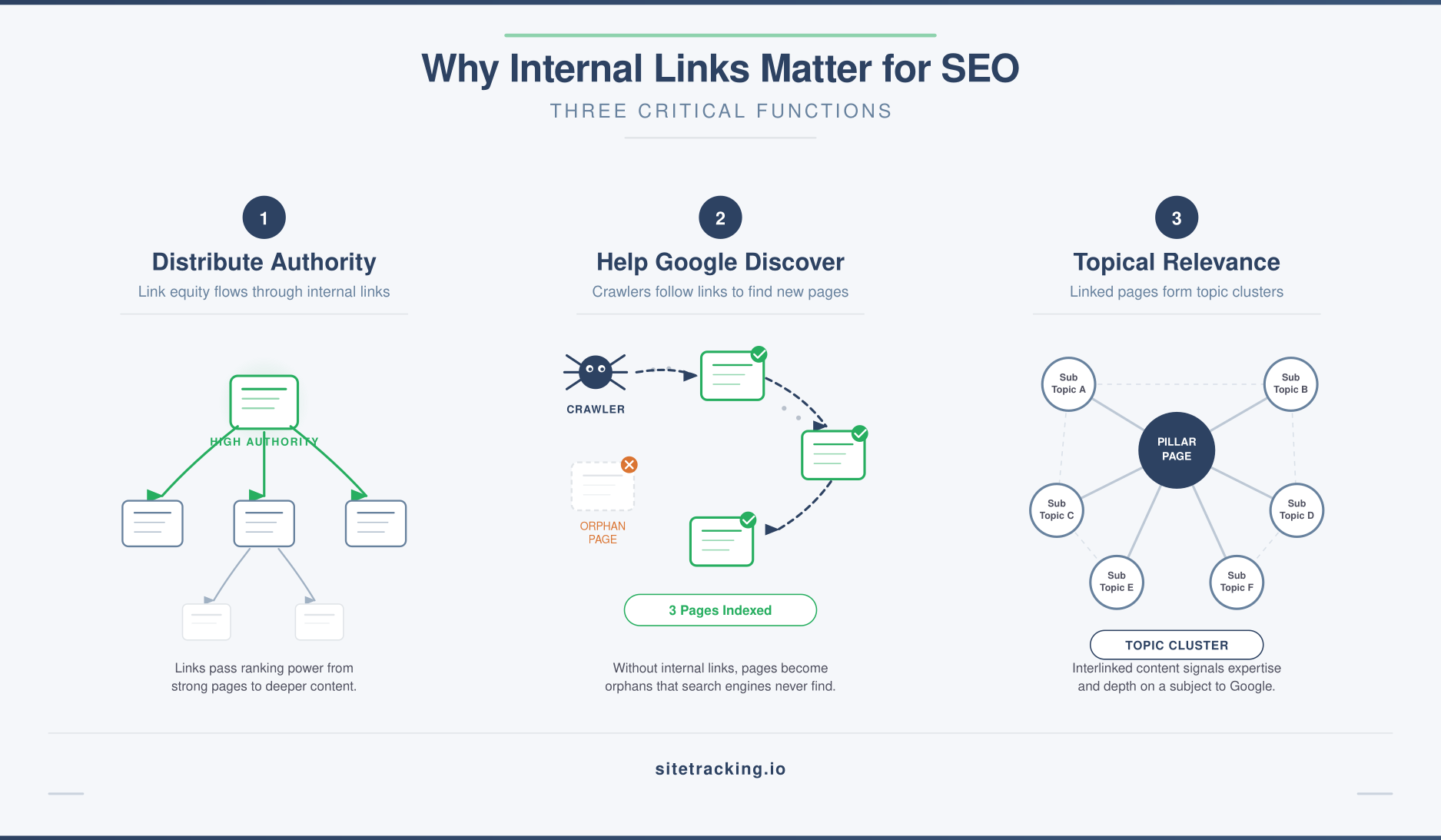
Internal links serve three critical functions that directly affect your search rankings. Understanding these helps you see why random linking isn’t enough.
They distribute page authority
When one page earns backlinks from external sites, it accumulates authority. Internal links pass a portion of that authority to other pages on your site. Without internal links, that authority stays trapped on the page that earned it. As a result, your other pages compete without the ranking boost they could have.
They help Google discover and index content
Google crawls your site by following links. If a page has no internal links pointing to it, Google may never find it — or may deprioritize crawling it. This is especially common for newer blog posts that haven’t been linked from anywhere yet. In fact, pages with zero internal links are called “orphan pages” and they’re essentially invisible to search engines.
They establish topical relevance
When you link several related articles together, you signal to Google that your site covers a topic comprehensively. This is the foundation of topic clusters — a content strategy where a central “pillar” page links to multiple supporting pages, and they all link back. Google rewards this kind of topical depth with higher rankings for the entire cluster.
What is a topic cluster?
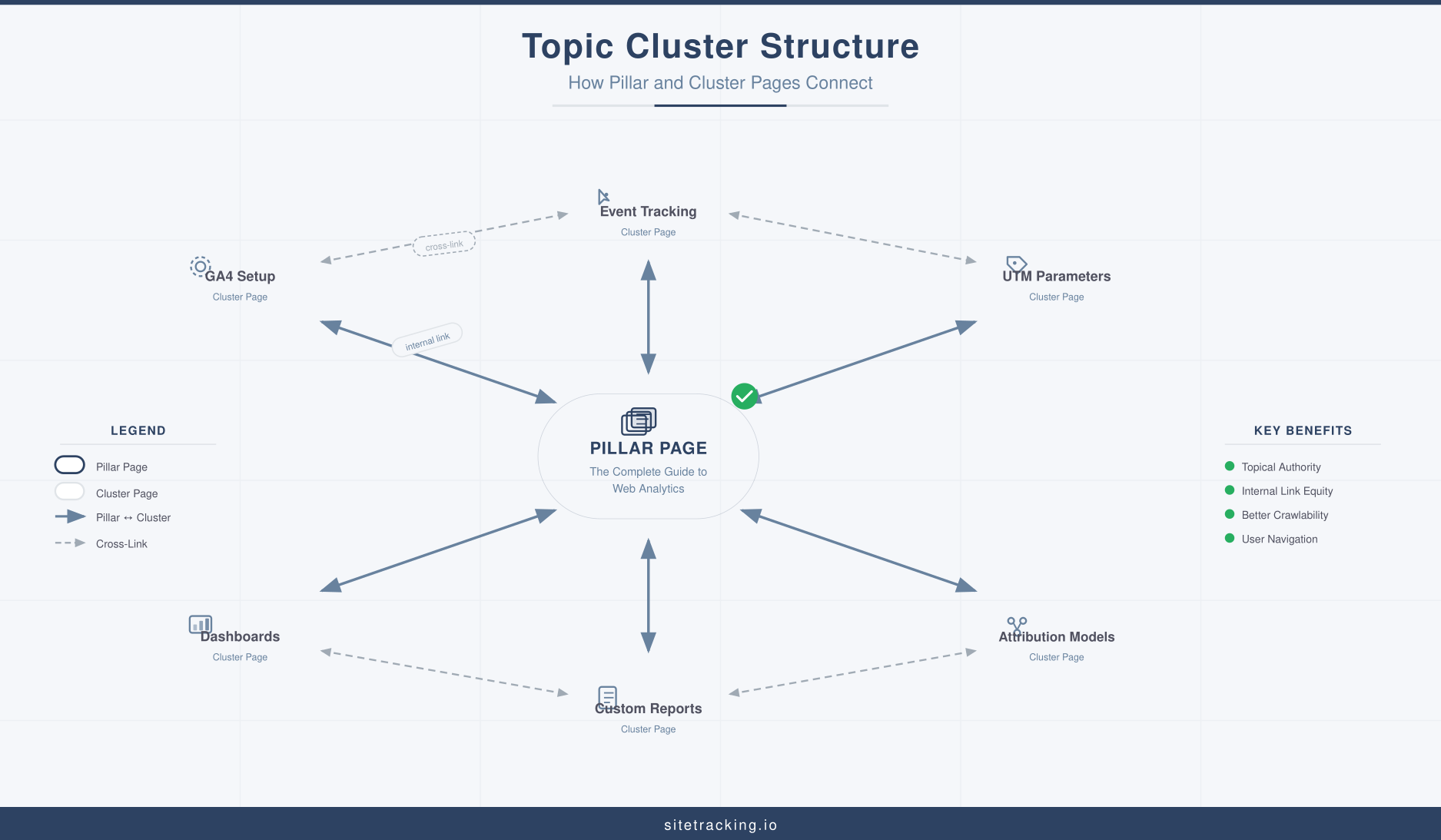
A topic cluster is a group of related content organized around a central pillar page. The structure is simple:
- Pillar page — A comprehensive, broad overview of a topic. It covers the subject at a high level and links out to more detailed articles. For example, “The Complete Guide to Web Analytics” would be a pillar page.
- Cluster pages — Detailed articles that cover specific subtopics. Each one links back to the pillar page. For example, “GA4 event naming conventions” and “UTM parameters guide” would be cluster pages under a web analytics pillar.
- Internal links — The connections between pillar and cluster pages. Pillar links to all clusters. Each cluster links back to the pillar. Clusters also link to each other where relevant.
This structure tells Google: “We don’t just have one article about analytics. We have an entire section of interconnected content that covers the topic thoroughly.” That comprehensive coverage is what builds topical authority.
How to build your internal linking strategy: step by step
Here’s the practical process I use for building topic clusters and internal link structures. It works whether you’re starting from scratch or reorganizing existing content.
Step 1: Audit your existing content
Before building anything new, understand what you already have. Export a list of all published pages with their URLs, titles, and target keywords. Then group them by topic. You’ll likely find natural clusters already forming — articles that cover related subjects but aren’t linked to each other.
Use Google Search Console to identify which pages rank for which queries. This helps you see overlaps (multiple pages competing for the same keyword) and gaps (subtopics you haven’t covered yet).
Step 2: Define your pillar topics
Choose 3-7 broad topics that represent your core expertise. Each pillar topic should be broad enough to support 5-15 cluster articles. For a digital marketing site, pillar topics might include:
- Web Analytics (pillar) → GA4 setup, event tracking, UTM parameters, dashboards, attribution
- SEO (pillar) → Core Web Vitals, internal linking, keyword research, technical SEO, content optimization
- Conversion Optimization (pillar) → landing pages, form optimization, A/B testing, conversion events
The pillar page targets a high-volume, competitive keyword. Cluster pages target more specific, long-tail keywords. Together, they cover the full spectrum of search intent for that topic.
Step 3: Map your cluster content
For each pillar, list all the subtopics that deserve their own page. Think about the questions your audience asks about this topic. Each question typically maps to a cluster article.
Create a simple spreadsheet with columns for: pillar topic, cluster page title, target keyword, status (existing/planned), and URL. This becomes your content map and linking guide.
Step 4: Create the linking structure
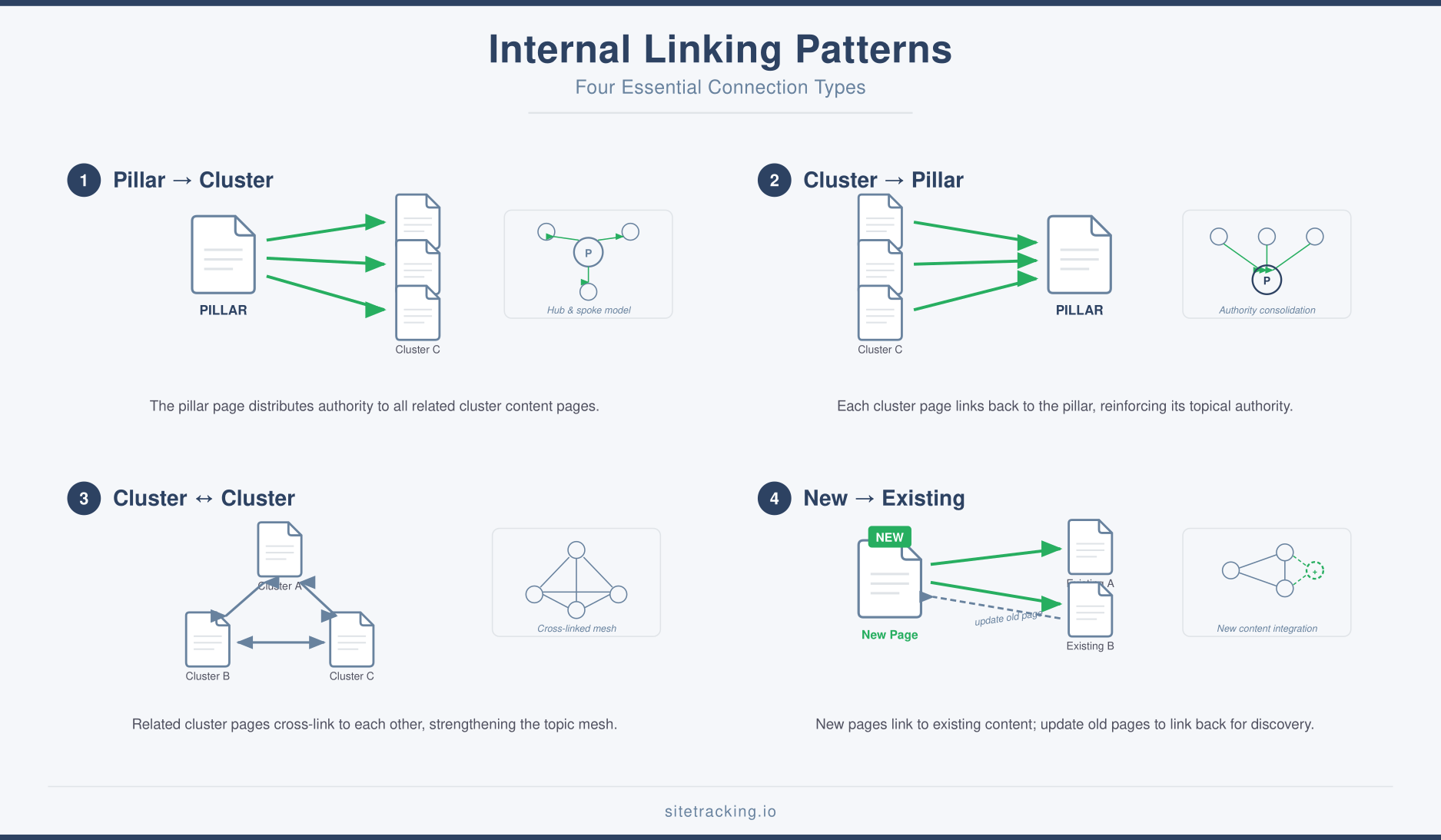
Now implement the actual links. Follow these patterns:
- Pillar → Cluster: The pillar page should link to every cluster page in the topic. Place these links contextually in the body text, not just in a list at the bottom.
- Cluster → Pillar: Every cluster page should link back to its pillar page at least once. The first mention of the broad topic is usually the natural place for this link.
- Cluster → Cluster: When one cluster article mentions a concept covered in another cluster article, link between them. These cross-links strengthen the cluster’s overall topical signal.
- New posts → Existing content: Every new article you publish should include 3-5 links to relevant existing content. Additionally, go back and add links from existing articles to the new one.
Internal linking best practices
Beyond the cluster structure, these practices ensure your internal links deliver maximum SEO value.
- Use descriptive anchor text. Link on relevant keywords, not generic phrases like “click here” or “read more.” If you’re linking to a page about marketing attribution models, use that phrase as the anchor text. This tells Google what the linked page is about.
- Place links high in the content. Links in the first few paragraphs carry more weight than links buried at the bottom. Prioritize prominent placement for your most important internal links.
- Don’t overdo it. Aim for 3-10 internal links per article, depending on length. Too many links dilute the value of each one and make content harder to read. Specifically, link only where it genuinely helps the reader find relevant information.
- Vary your anchor text. Don’t use the exact same anchor text for every link to a page. Use natural variations — “attribution models,” “how attribution works,” “compare attribution approaches.” This looks more natural and targets a broader range of keywords.
- Fix broken internal links. Broken links waste crawl budget and create dead ends. Run a monthly check using Screaming Frog or a similar crawler to identify and fix 404 errors in your internal link structure.
- Link from high-authority pages. If one of your pages has strong backlinks, make sure it links to your most important content. That authority flows through internal links to the pages you want to rank.
Common internal linking mistakes
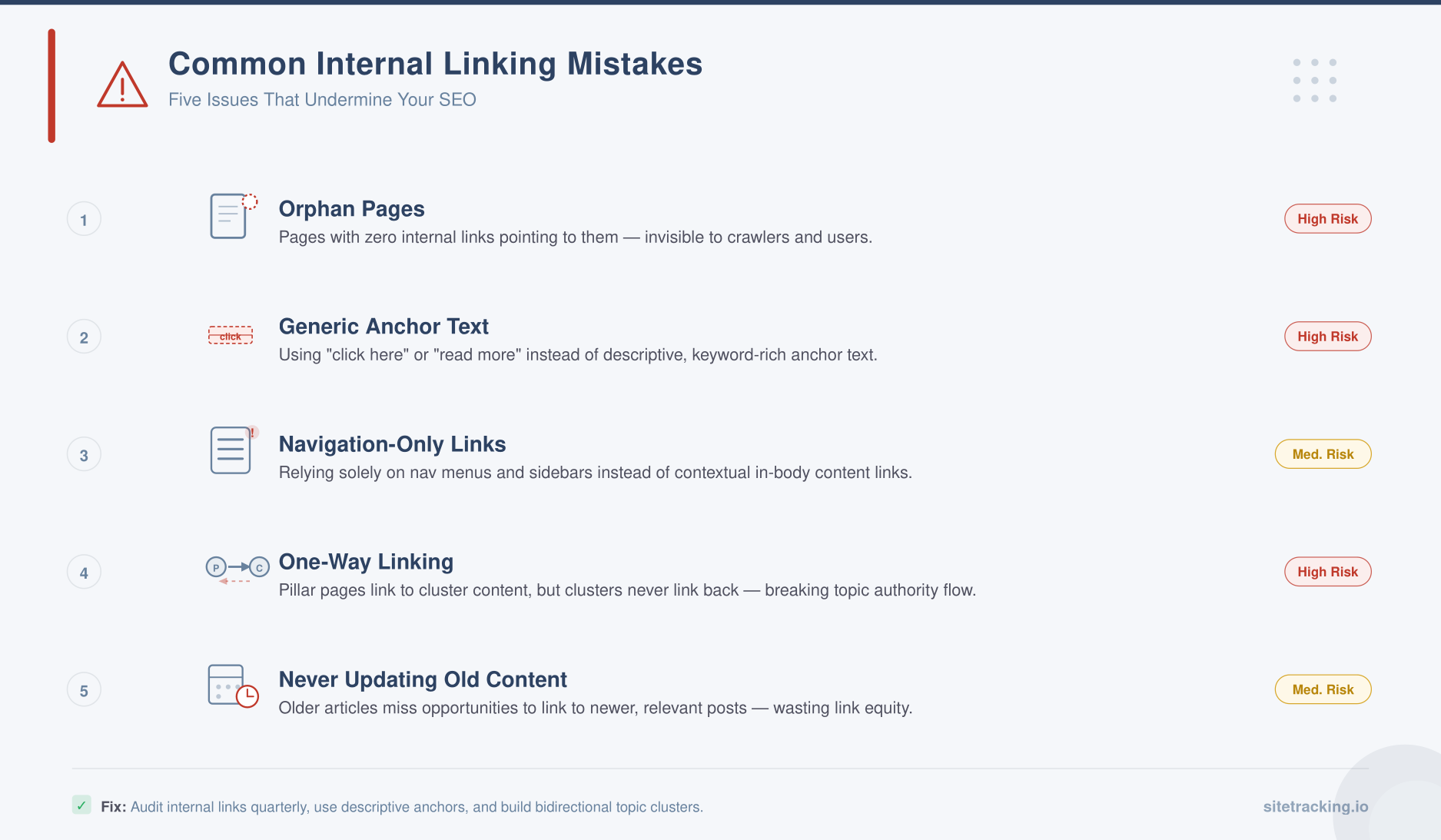
These mistakes are surprisingly common, even on well-optimized sites. Each one undermines the SEO value of your internal links.
- Orphan pages. Pages with zero internal links pointing to them. Google may never discover or index these pages. After every content audit, check for orphans and add links.
- Generic anchor text. Using “click here,” “learn more,” or “this article” tells Google nothing about the linked page. Always use descriptive, keyword-rich anchors.
- Linking only from navigation. Nav links help with site structure, but they pass less contextual relevance than body content links. Make sure important pages receive links from within article text, not just menus.
- One-way linking. If your pillar links to clusters but clusters never link back, you’re leaving authority on the table. Bidirectional linking strengthens the entire cluster.
- Never updating old content. When you publish a new article, your old articles don’t automatically know about it. Schedule time to add links from existing content to new posts. This is the most overlooked step in any internal linking strategy.
How to measure internal linking effectiveness
Track these metrics to understand whether your internal linking strategy is working.
- Pages per session. In GA4, check if users are visiting more pages per session after you improve internal linking. An increase means your links are guiding users to related content.
- Organic traffic to cluster pages. Monitor whether cluster pages gain organic traffic after being linked from the pillar. Use Google Search Console to track impressions and clicks for cluster page keywords.
- Crawl stats. In Search Console → Settings → Crawl Stats, check if Google is discovering and crawling your pages more frequently. Better internal linking typically increases crawl coverage.
- Internal links per page. Use Screaming Frog or Ahrefs Site Audit to measure how many internal links each page receives. Pages with fewer than 3 incoming internal links likely need more connections.
Combine these metrics with your conversion tracking data to see the full picture. More internal linking should improve both SEO traffic and user engagement — if users actually follow the links, your content structure is working.
Frequently Asked Questions
How many internal links should each page have?
There’s no hard limit, but aim for 3-10 contextual internal links per article depending on word count. A 2,000-word article with 5-8 internal links is typical. More importantly, every link should add value for the reader. Don’t force links just to hit a number — relevance matters more than quantity.
Should I use nofollow on internal links?
Almost never. Internal nofollow tags prevent authority from flowing to linked pages. The only exception is links to login pages, admin areas, or other pages you don’t want indexed. For all content pages, use standard followed links to maximize the SEO benefit.
How often should I update my internal links?
Review your internal linking structure quarterly. However, every time you publish a new article, immediately add 3-5 links from relevant existing content to the new post. This “link back” habit is the single most impactful thing you can do for your internal linking strategy on an ongoing basis.
Key takeaways
- Internal links distribute authority, help Google discover content, and establish topical relevance. They’re as important as backlinks for many sites.
- Build topic clusters — pillar pages linked to detailed cluster pages, with links flowing in both directions.
- Use descriptive anchor text — link on relevant keywords, not “click here” or “read more.”
- Eliminate orphan pages — every page should have at least 3 internal links pointing to it.
- Update old content when you publish new articles — add links from existing pages to new ones.
- Measure impact with pages per session, organic traffic growth, and crawl stats.
A strong internal linking strategy isn’t something you set up once and forget. It’s an ongoing practice that gets more powerful as your content library grows. Every new article is an opportunity to strengthen your entire site’s topical authority — but only if you connect it to the rest. Start with a content audit, identify your clusters, and build the links. The compound effect on your organic traffic will follow.