
UTM Parameters Guide: How to Tag Every Campaign Link Without Breaking Your Analytics

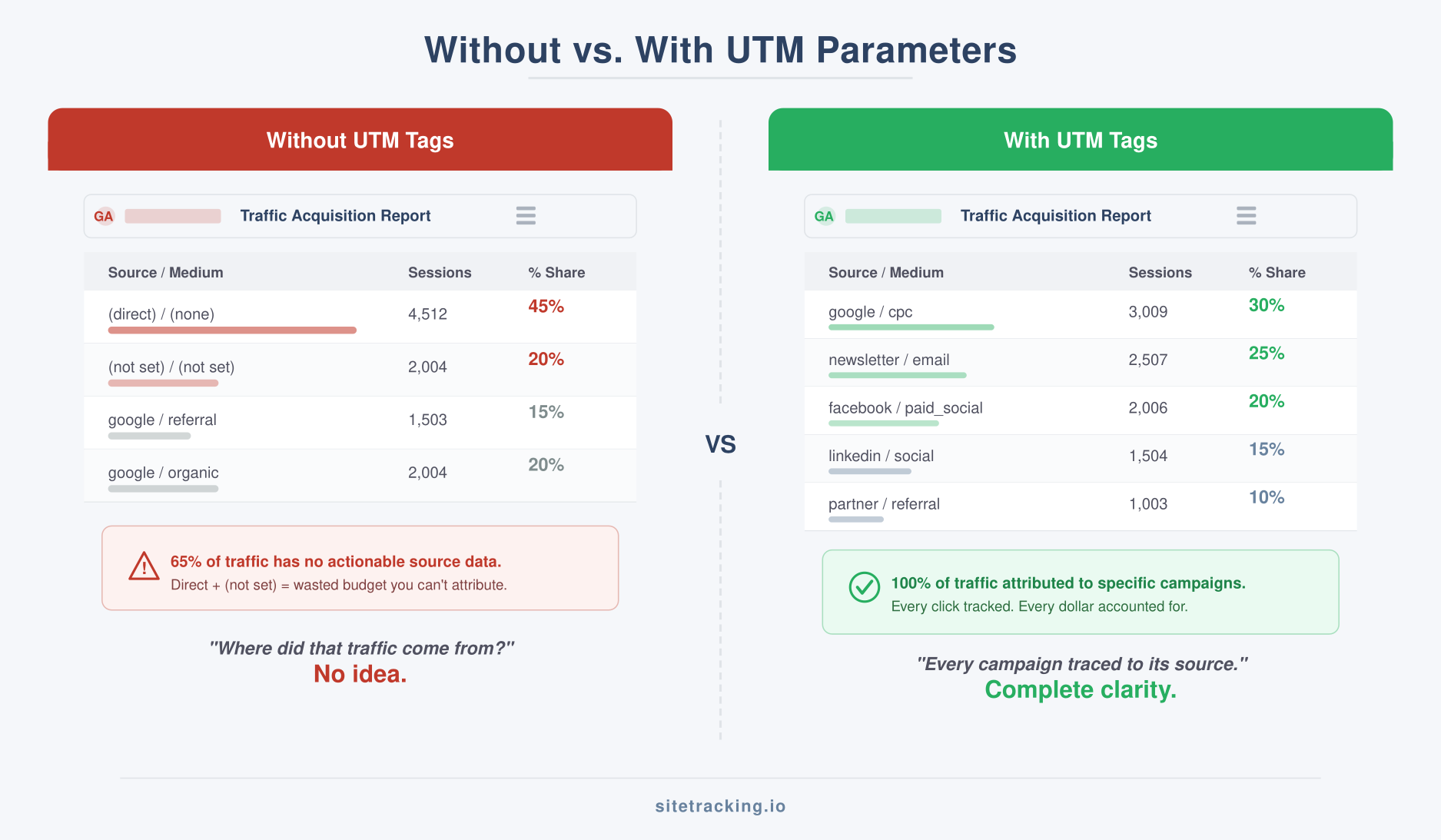
You’re looking at your GA4 traffic sources report. Organic search, direct, referral — those make sense. But then there’s a chunk labeled “(not set)” and another one called “email” that you’re pretty sure came from three different campaigns. Which email? Which link? No idea.
This is what happens without a proper UTM parameters strategy. You spend money driving traffic, but you can’t tell which specific campaigns, posts, or links actually worked. The data exists — you just didn’t tag it.
In this guide, I’ll walk you through everything you need to know about UTM parameters: what each one does, how to structure them consistently, and how to avoid the tagging mistakes that pollute analytics for months. Whether you’re a solo marketer or managing a team, this framework will keep your campaign data clean.
What are UTM parameters?
UTM parameters (Urchin Tracking Module) are tags you add to the end of a URL to tell your analytics tool where traffic came from. When someone clicks a tagged link, the parameters get passed to GA4, which uses them to populate your traffic source reports.
A tagged URL looks like this:
https://sitetracking.io/guide/?utm_source=newsletter&utm_medium=email&utm_campaign=feb_2026
Everything after the ? is UTM data. The page loads exactly the same — the visitor doesn’t notice anything different. But your analytics now knows this visit came from a newsletter email sent in February 2026. That level of detail is what separates “we think email works” from “our February newsletter drove 340 visits and 12 conversions.”
The five UTM parameters explained
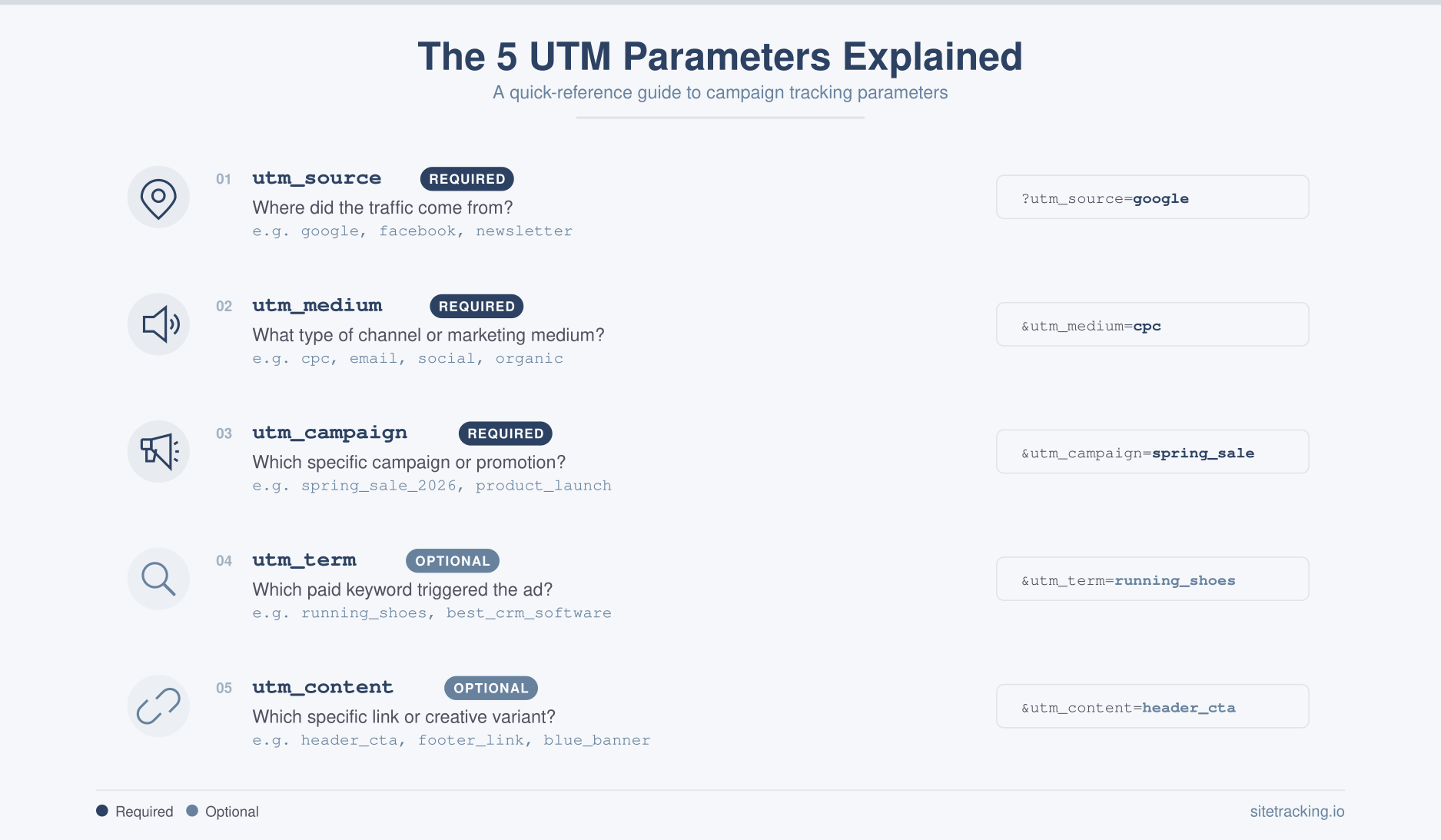
There are five standard UTM parameters. Three are required, two are optional. Here’s what each one does and when to use it.
utm_source (required)
Identifies where the traffic comes from. This is the platform or publisher sending the visitor.
utm_source=google— Google Adsutm_source=facebook— Facebook/Metautm_source=newsletter— your email newsletterutm_source=linkedin— LinkedIn posts or adsutm_source=partner_site— a specific referral partner
utm_medium (required)
Identifies the marketing channel type. This groups your traffic into categories.
utm_medium=cpc— cost-per-click paid adsutm_medium=email— email campaignsutm_medium=social— organic social postsutm_medium=paid_social— paid social adsutm_medium=referral— partner or affiliate linksutm_medium=display— display/banner ads
Keep your medium values consistent. If one person tags links with Email, another with email, and a third with e-mail, GA4 creates three separate medium entries. As a result, your channel groupings break.
utm_campaign (required)
Identifies the specific campaign or promotion. This is where you name your initiative.
utm_campaign=spring_sale_2026utm_campaign=product_launch_v2utm_campaign=weekly_digest_feb05utm_campaign=webinar_attribution_models
Use descriptive names that your whole team can understand months later. Avoid codes like camp_0247 that require a lookup table to decipher.
utm_term (optional)
Originally designed for paid search keywords. If you’re running Google Ads with manual tagging, use this to identify which keyword triggered the ad. For other channels, you can repurpose it to track audience segments or targeting criteria.
utm_content (optional)
Used to differentiate between multiple links in the same campaign. For example, if your email has two CTAs — a header button and a footer link — use utm_content=header_cta and utm_content=footer_link to see which one people click.
UTM parameters naming convention
Here’s the thing — UTM parameters are only as useful as your naming consistency. Without clear rules, your data fragments into dozens of variations that all mean the same thing. I’ve seen accounts where “facebook” appeared as Facebook, fb, facebook.com, FB_Ads, and meta — all in the same quarter.
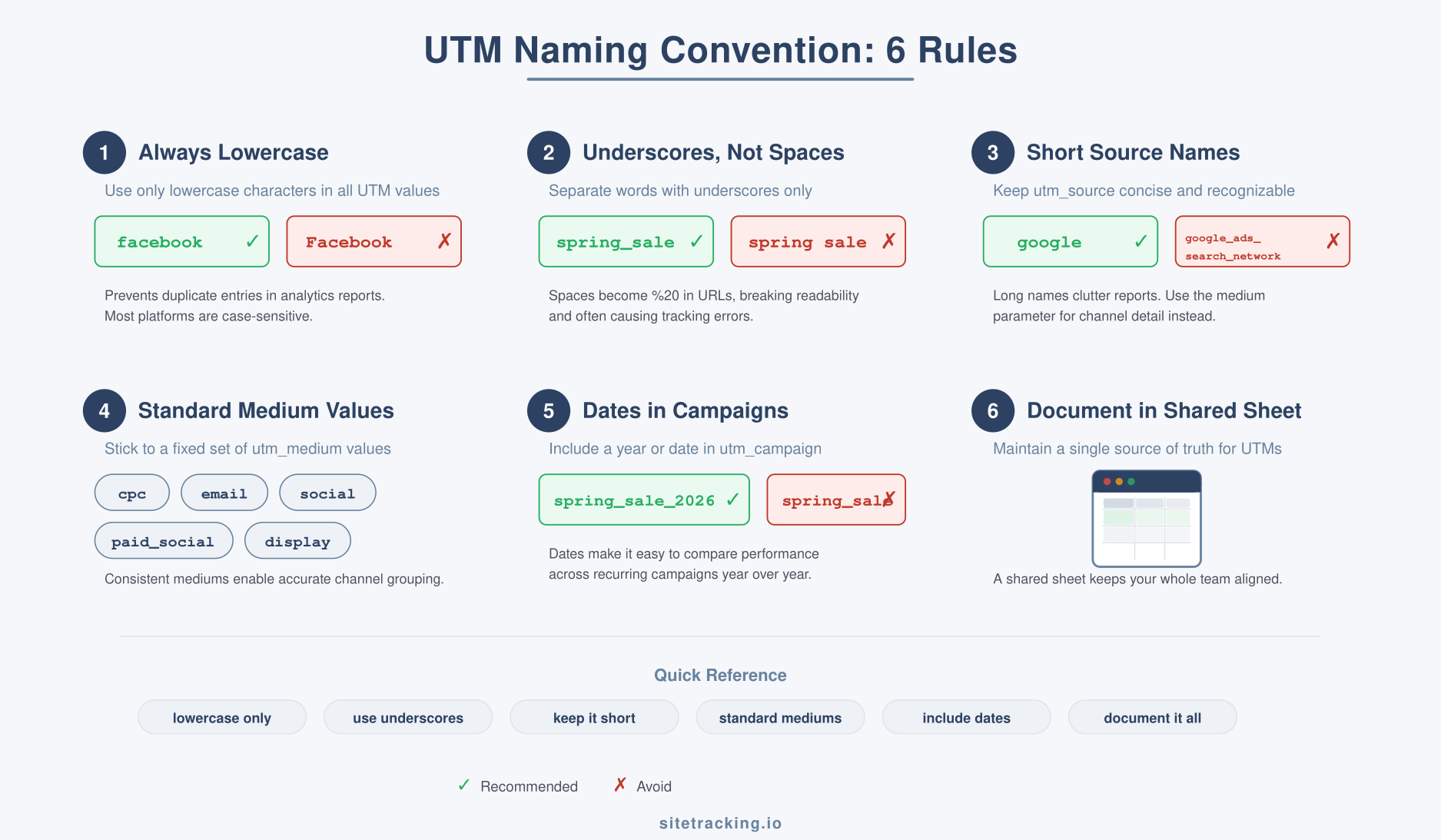
Follow these rules and your data stays clean:
- Always use lowercase. UTM parameters are case-sensitive.
Emailandemailcreate separate entries. Use lowercase everywhere — no exceptions. - Use underscores, not spaces or hyphens. Spaces become
%20in URLs and look messy. Hyphens work but underscores are more readable in reports. Pick one and stick with it. - Keep source names short and platform-specific. Use
google,facebook,linkedin,twitter— notgoogle_ads_search_network. - Standardize medium values. GA4 uses medium to create default channel groups. If you use non-standard values, your traffic lands in “(Other)”. Stick with:
cpc,email,social,paid_social,display,referral,affiliate. - Include dates in campaign names.
spring_salerepeats every year.spring_sale_2026orspring_sale_q2_2026is specific and won’t collide with historical data. - Document everything in a shared spreadsheet. Create a master UTM tracker with columns for URL, source, medium, campaign, content, owner, and launch date. This prevents duplicate campaign names and makes reporting easier.
These rules align with the same principles behind consistent GA4 event naming conventions — lowercase, predictable patterns, and documentation. Consistency in tagging is what makes your analytics trustworthy.
UTM parameters by channel: a complete reference
Here’s a ready-to-use UTM template for every major marketing channel. Adapt the campaign names to your specific initiatives, but keep the source and medium values exactly as shown.
| Channel | utm_source | utm_medium | utm_campaign (example) |
|---|---|---|---|
| Google Ads (Search) | cpc | brand_search_q1_2026 | |
| Google Ads (Display) | display | remarketing_feb_2026 | |
| Facebook Ads | paid_social | lookalike_launch_feb | |
| LinkedIn Ads | paid_social | b2b_lead_gen_q1 | |
| Email Newsletter | newsletter | weekly_digest_feb05 | |
| Drip Campaign | drip | onboarding_sequence | |
| Organic LinkedIn | social | thought_leadership | |
| Organic Twitter/X | social | product_updates | |
| Partner Referral | partner_name | referral | co_marketing_feb |
| Affiliate | affiliate_name | affiliate | commission_program |
Notice how source identifies who sent the traffic, medium identifies what type of channel it is, and campaign identifies which specific effort. This three-level hierarchy gives you both high-level channel views and granular campaign analysis.
How to build UTM links
You have several options for generating tagged URLs, from manual to fully automated.
Google’s Campaign URL Builder
The simplest starting point. Go to Google’s Campaign URL Builder, fill in your parameters, and it generates the tagged URL. Good for one-off links, but tedious for bulk campaigns.
Spreadsheet-based approach
For teams, build a Google Sheet with input columns for each UTM parameter and a formula column that concatenates them into the final URL. This serves double duty as both a link generator and a campaign log. Additionally, it enforces your naming convention because everyone picks values from dropdown lists rather than typing freeform.
URL shorteners
Long UTM-tagged URLs look ugly in social posts and emails. Use a URL shortener like Bitly or your own branded short domain. The UTM parameters still get passed through — the shortener just redirects. Therefore, you get clean-looking links without losing tracking data.
Common UTM parameter mistakes
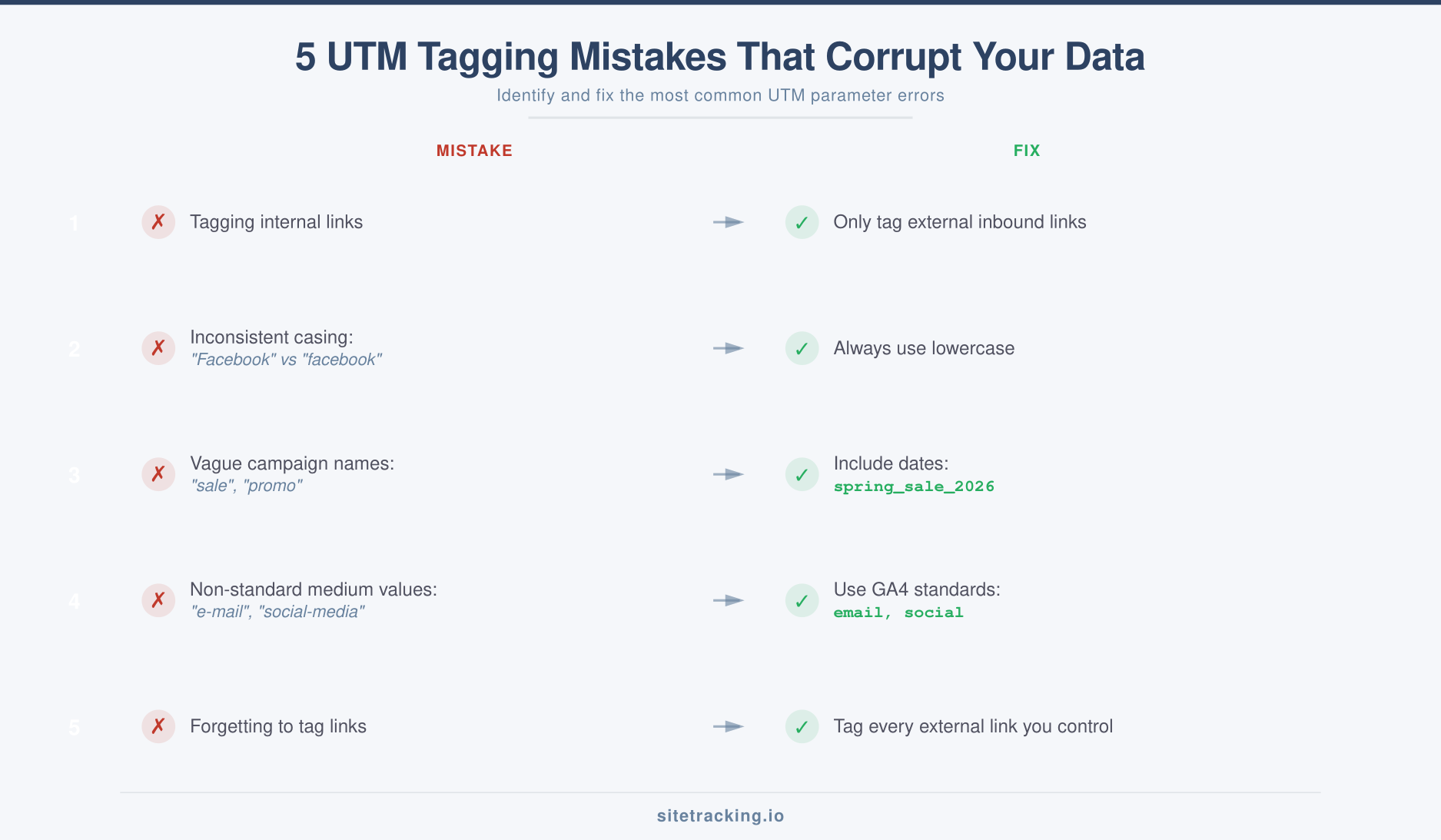
In my experience auditing campaign tracking setups, these mistakes appear more often than not. Each one creates a data quality problem that compounds over time.
- Tagging internal links. Never add UTM parameters to links between pages on your own site. This overrides the original traffic source. A visitor who came from Google Ads will suddenly appear as “source: homepage_banner” if you UTM-tag an internal promotion link.
- Inconsistent casing.
utm_source=Facebookvsutm_source=facebookcreates two separate sources in GA4. Always use lowercase. - Vague campaign names.
utm_campaign=saleis useless three months later. Was it the spring sale? The flash sale? Include the year and quarter at minimum. - Using non-standard medium values. GA4’s default channel groupings depend on specific medium values. If you use
utm_medium=e-mailinstead ofemail, your traffic goes to “(Other)” instead of the “Email” channel. Consequently, your channel reports become unreliable. - Forgetting to tag at all. Every external link you control — ads, emails, social posts, partner links — should be tagged. Untagged traffic gets lumped into “direct” or “referral” and you lose the ability to measure campaign performance.
UTM parameters for additional platforms
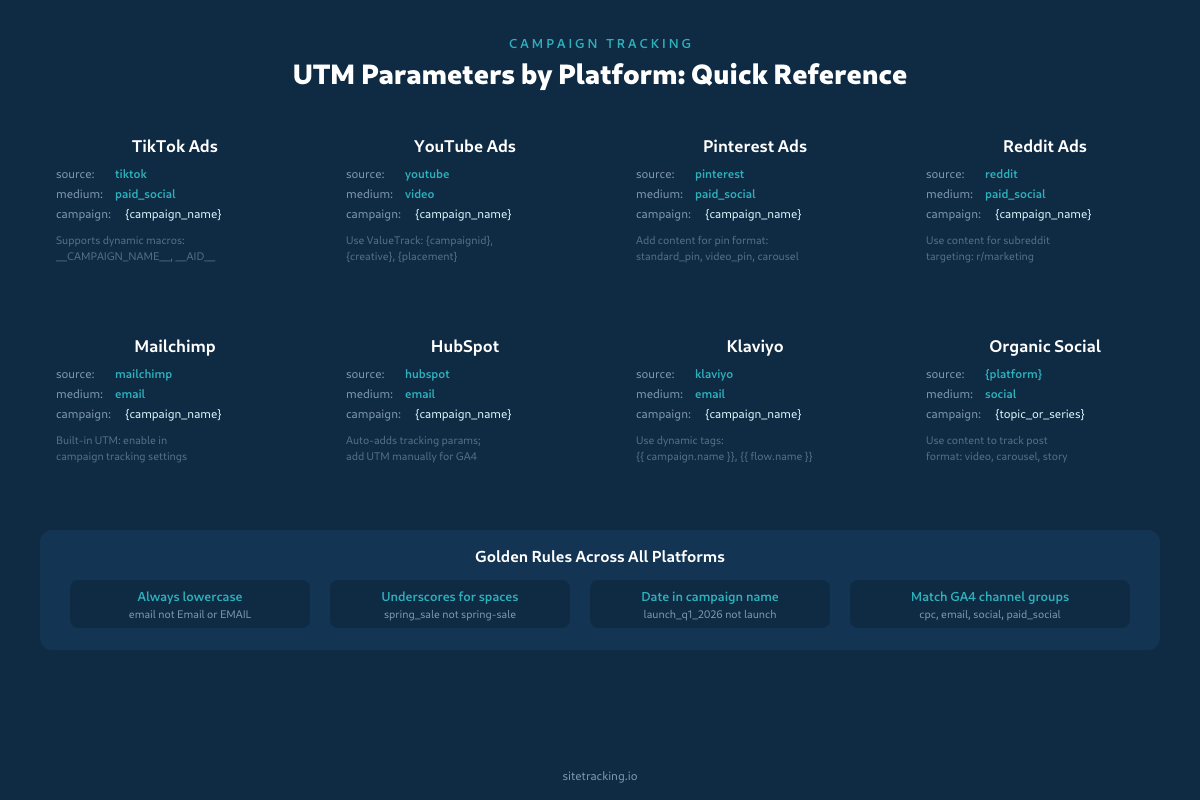
The channel reference table above covers the most common platforms. But modern marketing spans TikTok, Pinterest, YouTube, Reddit, and a growing list of others. Here’s how to tag each one consistently.
TikTok Ads
Use utm_source=tiktok and utm_medium=paid_social. TikTok’s ad platform supports dynamic URL macros: __CAMPAIGN_NAME__, __AID__ (ad group ID), and __CID__ (creative ID). Insert these directly into your UTM values to auto-populate campaign details without manual tagging per ad.
Example: ?utm_source=tiktok&utm_medium=paid_social&utm_campaign=__CAMPAIGN_NAME__&utm_content=__CID__
YouTube Ads
YouTube ads run through Google Ads, so auto-tagging (gclid) works here. But if you need UTM tags for other analytics tools, use utm_source=youtube and utm_medium=video. Google Ads ValueTrack parameters ({campaignid}, {creative}, {placement}) work in YouTube campaign URLs just like in Search campaigns.
Pinterest and Reddit
Both platforms use utm_medium=paid_social with their respective source names. For Pinterest, use utm_content to distinguish pin formats (standard, video, carousel). For Reddit, use utm_content to track subreddit targeting — knowing that r/marketing converts differently than r/analytics is valuable data.
Email platforms: Mailchimp, HubSpot, Klaviyo
Most email platforms offer built-in UTM tagging. Mailchimp adds UTM parameters automatically when you enable “Google Analytics link tracking” in campaign settings — but it uses its own naming format, so verify the values match your convention. HubSpot auto-appends its own tracking parameters; add UTM tags manually if you need GA4 campaign attribution. Klaviyo supports dynamic template tags like {{ campaign.name }} and {{ flow.name }} directly in UTM values.
For all email platforms, use utm_medium=email (never e-mail or Email). Use the platform name as utm_source so you can compare performance across email tools: mailchimp, hubspot, klaviyo.
Dynamic UTM parameters
Manual UTM tagging works for small campaigns, but it breaks down when you’re running hundreds of ads across multiple platforms. Dynamic parameters let the ad platform automatically fill in UTM values at click time.
Google Ads ValueTrack is the most mature system. Use curly-brace macros in your final URL suffix:
| ValueTrack Parameter | Outputs | UTM Use |
|---|---|---|
{campaignid} | Campaign ID number | utm_campaign |
{adgroupid} | Ad group ID number | utm_content |
{keyword} | Matched keyword | utm_term |
{matchtype} | Broad, phrase, or exact | utm_term suffix |
{network} | Search (g) or Display (d) | utm_medium suffix |
Example final URL suffix: utm_source=google&utm_medium=cpc&utm_campaign={campaignid}&utm_term={keyword}_{matchtype}&utm_content={adgroupid}
Meta (Facebook/Instagram) supports URL parameters at the ad level: {{campaign.name}}, {{adset.name}}, {{ad.name}}. These auto-populate from your campaign structure — no manual updates when you rename campaigns.
Dynamic parameters are especially powerful when combined with multi-touch attribution models — they give you the granularity needed to see exactly which ad variation contributed to each conversion.
How to audit and clean up messy UTM data
If your GA4 traffic source reports show dozens of variations for the same platform — Facebook, facebook, fb, Facebook_Ads — you have a UTM hygiene problem. Here’s how to fix it.
Step 1: Export and audit
In GA4, go to Explorations and create a Free Form report with Source, Medium, and Campaign as dimensions. Export to CSV. Sort by source and look for duplicates: case variations, abbreviations, and typos. You’ll typically find that 20-30% of your source entries are duplicates of existing values.
Step 2: Build a cleanup mapping
Create a spreadsheet mapping every incorrect value to its canonical form. For example: Facebook → facebook, fb → facebook, e-mail → email. This becomes your reference for fixing active campaigns and your documentation for onboarding new team members.
Step 3: Fix at the source
You can’t retroactively fix UTM data in GA4 — once it’s recorded, it stays as-is. What you can do: update all active campaign links immediately, create GA4 data filters for common patterns (like forcing lowercase), and distribute your naming convention document to everyone who creates campaign links.
Going forward, prevent the problem by using a shared UTM builder spreadsheet with dropdown validation. No freeform typing means no typos. This is the same principle behind standardizing GA4 event naming conventions — governance at the point of creation is easier than cleanup after the fact.
How UTM data appears in GA4
Once your links are tagged, the data flows into several GA4 reports. Here’s where to find it.
Acquisition reports: Go to Reports → Acquisition → Traffic Acquisition. Change the primary dimension to “Session source/medium” or “Session campaign” to see your UTM data. Google’s traffic source dimensions documentation explains how each UTM parameter maps to GA4 dimensions. You can also use secondary dimensions to drill down further.
Explorations: For deeper analysis, create a Free Form exploration with dimensions like Source, Medium, Campaign, and Content. Combine with metrics like Sessions, Conversions, and Revenue to calculate ROI per campaign.
Attribution reports: Your UTM-tagged campaigns appear in GA4’s attribution reports, where you can see how different campaigns contribute to marketing attribution across the full customer journey — from the first conversion event to final purchase.
For campaign-driven landing pages, combine UTM tracking with proper landing page conversion tracking to get the full picture: which campaign drove the visit and what the visitor did after arriving.
Frequently Asked Questions
Do UTM parameters affect SEO?
No, not directly. Google ignores UTM parameters when evaluating pages for search ranking. However, if your CMS creates separate pages for each UTM variation (some poorly configured systems do), this can cause duplicate content issues. Most modern CMS platforms handle this correctly, but it’s worth verifying with a canonical tag check.
Should I tag Google Ads links manually?
Google Ads has auto-tagging (gclid) which works automatically with GA4 and provides more detailed data than manual UTM tags. Leave auto-tagging enabled. However, if you also use other analytics tools that don’t support gclid, add manual UTM tags as a backup. In GA4 settings, you can configure which takes priority.
How many UTM parameters should I use per link?
At minimum, always include source, medium, and campaign — those three are required for meaningful reporting. Add content when you have multiple links in the same campaign (like an email with two CTAs). Use term only for paid search keyword tracking. More parameters mean more detail, but also more room for inconsistency. Specifically, focus on the three required ones and add optional parameters only when the extra detail serves a clear analytical purpose.
Do UTM parameters expire?
No, UTM parameters don’t have an expiration date. A tagged URL works forever as long as the destination page exists. However, GA4 attributes the UTM data to a session — so the parameters apply to the visit that clicked the link, not to future visits from the same user. If a user bookmarks your UTM-tagged URL and visits again later, GA4 records a new session with those same UTM values. This is why some teams see inflated campaign numbers — bookmark traffic gets attributed to the original campaign.
Can UTM parameters break a link or page?
In most cases, no. UTM parameters are query strings that the server ignores when serving the page. However, problems can occur if: your URL already has query parameters and you add UTM tags with ? instead of & (creating a malformed URL), or if your server or CDN strips query strings aggressively. Always test tagged URLs before launching a campaign. And use & between parameters if the URL already contains a ?.
What’s the difference between UTM tracking and gclid?
UTM parameters are manually added tags that work with any analytics tool. Gclid (Google Click Identifier) is automatically appended by Google Ads and carries richer data — including keyword, ad group, match type, and cost — but only works with Google Analytics. If you use GA4 exclusively, leave Google Ads auto-tagging on and use UTM tags for everything else. If you use multiple analytics platforms, add both: auto-tagging for GA4 depth, UTM tags for cross-platform consistency.
Should I tag organic social media posts?
Yes. Without UTM tags, traffic from social platforms often gets classified as “direct” or “referral” in GA4 — especially when links are shared via mobile apps (which strip referrer headers). Tag every link you share on social media with utm_source={platform}&utm_medium=social. Use utm_campaign to group related posts (like a product launch series) and utm_content to track post format: video, carousel, story, link_post. This is the only way to get accurate social media attribution in your analytics.
Key takeaways
- Tag every external link you control — ads, emails, social posts, partner links. Untagged traffic is invisible traffic.
- Use all three required UTM parameters — source, medium, and campaign. They form the foundation of your traffic analysis.
- Always use lowercase — GA4 is case-sensitive. Mixed casing fragments your data.
- Standardize medium values to match GA4’s default channel groups —
cpc,email,social,paid_social,display. - Never tag internal links — this overwrites the original traffic source and corrupts your acquisition data.
- Document everything in a shared UTM tracker spreadsheet. Consistency comes from shared standards, not individual discipline.
UTM parameters are one of the simplest tools in your analytics toolkit — five tags on a URL, and suddenly you can trace every campaign to its results. The hard part isn’t the tagging itself. It’s building the discipline to do it consistently, every time, across your whole team. Start with the naming convention in this guide, create your shared tracker, and never wonder “where did that traffic come from?” again. Once your UTM tagging is solid, you can go deeper — tracking micro-conversions that predict revenue and connecting campaign data to real business outcomes.