
Google Ads Conversion Tracking: Setup and Why the Numbers Differ

Two dashboards, one week, one campaign. Google Ads reports 47 conversions. GA4 reports 31. Nobody changed anything in between, and both numbers are correct.
Google Ads conversion tracking is easy to switch on and easy to misread. The setup takes twenty minutes. Understanding what the resulting number counts — and why it will never match your analytics — is the part that decides whether you bid on it or argue about it.
What the tag does when it fires
A conversion action in Google Ads is a definition, not a script. You create it in the account — a purchase, a lead form, a call — and Google gives you a conversion ID and label that identify it. The tag on your site fires that pair when the action happens.
Delivery has two routes. The Google tag placed directly in your pages fires gtag('event', 'conversion', ...) with the ID and label. Google Tag Manager does the same through a Google Ads Conversion Tracking tag, with the trigger handled in GTM rather than in your markup. Neither route is better in the abstract. GTM wins when several tools need the same events; direct gtag wins when the site has one tool and nobody to maintain a container.
The consequential decision is not the route. It is what you count as a conversion. A conversion action set to “every” counts repeat purchases from one click separately; set to “one” it counts a single lead no matter how many times the thank-you page reloads. Ecommerce usually wants every. Lead generation almost always wants one, and setting it wrong is the single most common reason a lead-gen account reports numbers that feel inflated.
Why Google Ads and GA4 never agree
This is the question that eats meetings, so it is worth settling early: the two systems answer different questions and are supposed to disagree.
| Dimension | Google Ads | GA4 |
|---|---|---|
| Attribution credit | To the ad interaction, across devices and sessions | To the traffic source of the session, by GA4’s own model |
| Which date it lands on | The date of the click | The date of the conversion |
| Scope | Only ad-driven conversions | All conversions from all sources |
| Identity | Google’s own click and account signals | Cookies, and modelling where consent is missing |
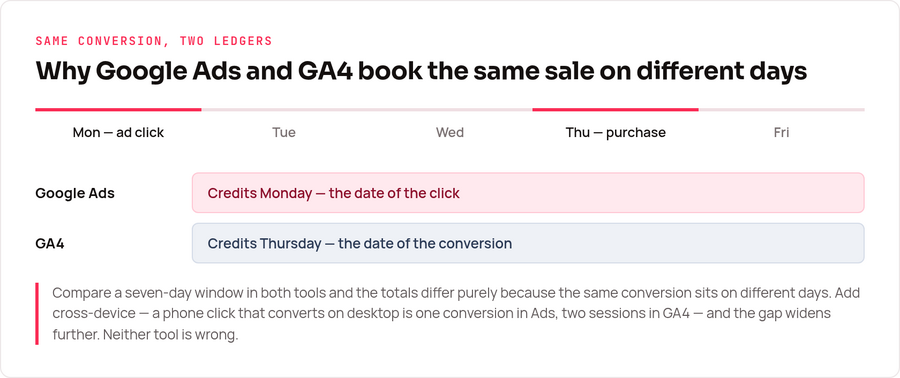
The date rule alone explains most of the gap people escalate. Someone clicks an ad on Monday and buys on Thursday: Google Ads books that conversion to Monday, GA4 books it to Thursday. Compare a seven-day window in both tools and the totals differ purely because the conversions sit on different days. Nothing is broken.
Cross-device is the second gap. A phone click that becomes a desktop purchase is one conversion in Google Ads, because Google can tie both to a signed-in account. In GA4, without that identity, it is a second session from a different source entirely.
The practical rule I hold to: use Google Ads conversions to make bidding decisions, and GA4 to understand behaviour across all channels. Reconciling them to the unit is a project with no finish line — the tools are measuring different objects. The same discipline applies to any two-tool comparison, which is why our analytics audit checklist starts with definitions before it looks at a single number.
Enhanced conversions, and what leaves your site
Enhanced conversions supplement your existing tag with first-party data you already collect. Per Google’s documentation, the data — email address, name, home address, phone number — is hashed with SHA-256, a secure one-way algorithm, before it is sent. Google matches those hashes against signed-in accounts to attribute conversions it would otherwise lose.
Two variants exist and they are not interchangeable. Enhanced conversions for web covers sales and events completed on your site. Enhanced conversions for leads covers offline transactions that started as a web lead — the deal closed in a CRM weeks after the form was submitted.
Worth being clear about the trade you are making, because “hashed” is doing a lot of work in that sentence. Hashing means Google does not receive the plaintext address. It does not mean no personal data leaves your site: a SHA-256 hash of an email is a stable identifier for that person, which is exactly why the matching works. Under GDPR that remains personal data, needs a lawful basis, and belongs in your privacy notice — the same reasoning we apply to deciding what counts as a conversion event in the first place.
The four failures worth checking for
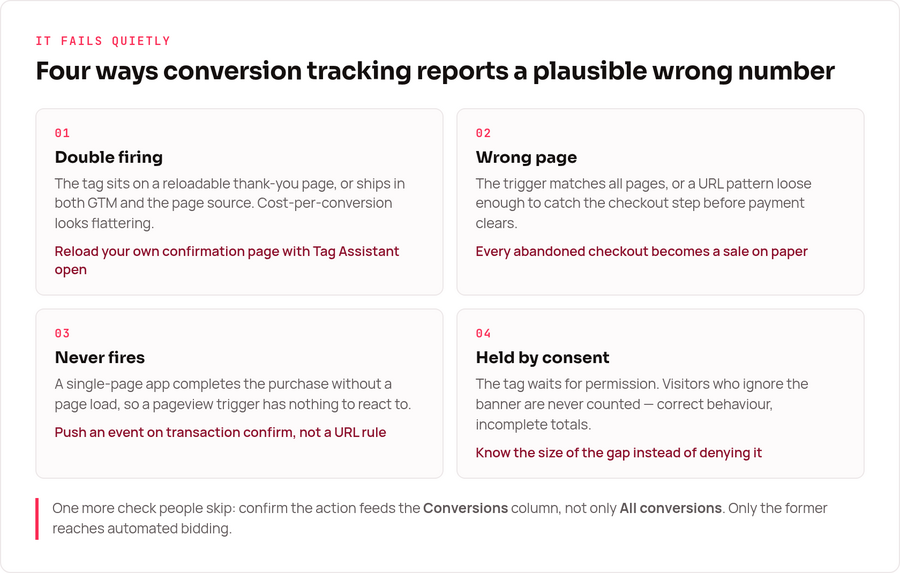
Conversion tracking rarely breaks loudly. It reports a plausible number that happens to be wrong, which is worse. Four causes cover nearly everything I have had to unpick.
Double firing. The tag sits on a thank-you page that visitors can reload, or it is deployed in both GTM and the page source. The count inflates and the cost-per-conversion looks flattering. Reloading your own confirmation page while watching Tag Assistant catches it in a minute.
Firing on the wrong page. The trigger is set to all pages, or to a URL pattern loose enough to match the checkout step before payment succeeds. Every abandoned checkout becomes a sale on paper.
No conversion at all. Single-page applications complete a purchase without a page load, so a pageview trigger never fires. The fix is an event pushed to the data layer at the moment the transaction confirms, not a URL rule.
Consent blocking the tag. With a consent banner in place, the conversion tag may be held until permission is given, and visitors who never interact with the banner are never counted. That is correct behaviour, and it means your reported conversions are a subset of real ones. Knowing the size of that subset matters more than pretending it doesn’t exist.
Verifying it before you trust it
Complete a real conversion yourself. Not a test tag, not preview mode alone — an actual purchase or form submission on the live site, with Tag Assistant open, watching the conversion tag fire exactly once with the right ID and label.
Then wait. Conversions surface in the Google Ads interface within about a day, so a status that still reads “no recent conversions” hours after a genuine test is information, not impatience. Once data arrives, check the conversion action’s status column — Google flags inactive or unverified actions there, and that flag is the fastest diagnosis available.
One more check people skip: confirm the conversion is included in the “Conversions” column rather than only in “All conversions”. Only the former feeds automated bidding. A conversion action excluded from that column is invisible to the algorithm you are paying to optimise your account.
Frequently asked questions
Why doesn’t Google Ads match GA4 conversions?
Google Ads credits the conversion to the date of the ad click and counts cross-device journeys; GA4 credits the date of the conversion and attributes by session source. Different objects, different totals, both correct.
Should I use gtag or Google Tag Manager?
GTM when multiple tools need the same events or when marketing needs to change triggers without a developer. Direct gtag when the site runs one tool and nobody will maintain a container. The tracking accuracy is identical.
Do enhanced conversions send customer emails to Google?
They send a SHA-256 hash rather than the plaintext address. The hash is still a stable identifier tied to a person — that is what makes matching work — so it remains personal data under GDPR and needs a lawful basis.
Why are my conversions suddenly zero?
Check the thank-you page still exists at the URL your trigger expects, that a site release did not drop the container, and that a consent-banner change is not holding the tag. A redesign that renamed the confirmation URL is the classic cause.
Where to start
Set the counting method before the tag — “one” for leads, “every” for sales — then deploy, complete one real conversion, and confirm it lands once. Do that much and the number in your bidding column means something.
After that, stop comparing totals across tools and start comparing trends within each one. A conversion count that moves the same direction in both dashboards is telling you something real; a count that matches to the unit is telling you the two tools were configured to answer the same narrow question, which is a waste of one of them.